Navigating the Digital Frontier: A Comprehensive Comparison of Essential Electronics
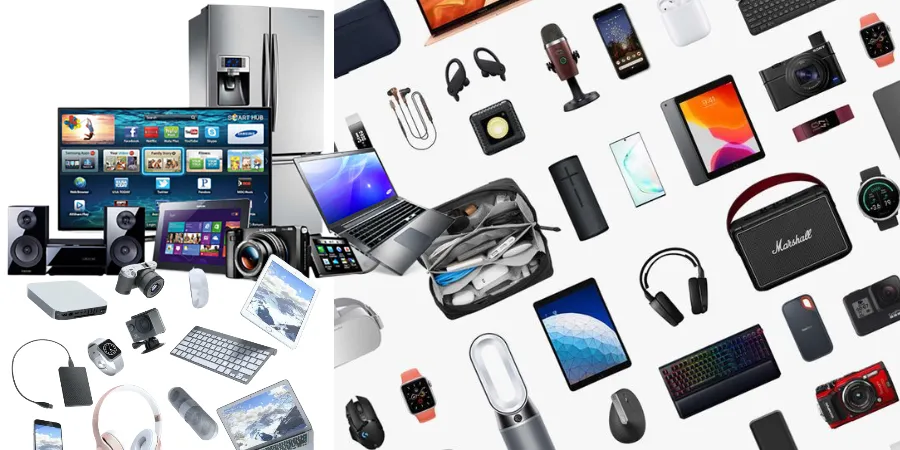
In today's hyper-connected world, electronics are no longer mere gadgets; they are indispensable tools that shape our daily lives, from how we work and communicate to how we entertain ourselves and manage our homes. The sheer volume and diversity of electronic devices available can be overwhelming, making informed purchasing decisions a crucial skill. This article aims to demystify the landscape of essential electronics by offering a detailed comparison of popular product categories, guiding you through the key considerations to ensure you invest wisely in technology that truly enhances your experience.
Smartphones: The Pocket-Sized Powerhouses
Smartphones have evolved from simple communication devices to sophisticated personal computers, cameras, and entertainment hubs. Choosing the right smartphone involves balancing features, performance, operating system, and budget. We'll compare the two dominant operating systems and discuss key hardware considerations.
iOS vs. Android: The Great Divide
The choice between iOS (Apple) and Android (Google) is often the first major decision a smartphone buyer faces. Each offers a distinct ecosystem, user experience, and app availability.
- iOS (Apple iPhones): Known for its intuitive interface, robust security features, and seamless integration with other Apple devices. The App Store is highly curated, ensuring a generally high standard of app quality. Updates are typically delivered simultaneously to all supported devices, offering a consistent experience. However, iOS devices generally come with a higher price tag and offer less customization compared to Android.
- Android (Various Manufacturers): Offers unparalleled customization, a wider range of hardware options at various price points, and more open access to the file system. The Google Play Store has a vast selection of apps, though quality can vary more widely. Android's open nature allows for greater flexibility, but software updates can be inconsistent depending on the manufacturer and carrier.
Key Hardware Considerations for Smartphones:
- Display: Screen size, resolution (HD, FHD, QHD), and display technology (LCD, OLED/AMOLED) significantly impact visual experience. OLED panels offer better contrast and deeper blacks.
- Processor (Chipset): Determines the phone's speed and multitasking capabilities. Higher-end chipsets offer smoother performance for demanding apps and games.
- RAM: Random Access Memory affects how many apps can run simultaneously without slowing down. 6GB or 8GB is generally sufficient for most users, while power users might consider 12GB or more.
- Storage: Internal storage (e.g., 128GB, 256GB, 512GB) dictates how many apps, photos, and videos you can store. Many Android phones offer expandable storage via microSD cards.
- Camera: Megapixel count is only one factor. Consider sensor size, aperture, image processing capabilities, and the presence of multiple lenses (wide, ultrawide, telephoto) for versatility.
- Battery Life: Measured in mAh (milliampere-hours), a larger capacity generally means longer usage time. Fast charging and wireless charging are also important convenience features.
Laptops: The Workhorses of Productivity and Entertainment
Laptops have become essential for work, study, and leisure. The choice depends heavily on your primary use case, portability needs, and budget. We'll compare different types of laptops and key specifications.
Types of Laptops:
- Traditional Laptops: Offer a balance of performance, portability, and features. Suitable for general productivity, web browsing, and multimedia consumption.
- Ultrabooks: Thinner, lighter, and more portable than traditional laptops, often with longer battery life. They prioritize design and mobility, sometimes at the expense of raw processing power or extensive port selection.
- 2-in-1 Laptops (Convertibles/Hybrids): Feature a touchscreen and a hinge that allows them to be used as a laptop or a tablet. Ideal for users who want versatility and touch interaction.
- Gaming Laptops: Built with high-performance components like dedicated graphics cards, powerful processors, and fast refresh rate displays to handle demanding games. They are typically heavier, bulkier, and have shorter battery life.
- Chromebooks: Run on Google's Chrome OS, designed for web-based tasks and cloud storage. They are generally more affordable, offer excellent battery life, and are ideal for students or users who primarily work online.
Key Specifications for Laptops:
| Specification | Importance & Considerations |
|---|---|
| Processor (CPU) | Intel Core (i3, i5, i7, i9) or AMD Ryzen (3, 5, 7, 9) series. Higher numbers generally indicate better performance. Consider the generation for optimal efficiency and features. |
| RAM | 8GB is a minimum for smooth multitasking. 16GB is recommended for professional use, creative tasks, or heavy multitasking. 32GB+ for intensive workloads. |
| Storage (SSD/HDD) | Solid State Drives (SSDs) are significantly faster than Hard Disk Drives (HDDs) for boot times and application loading. NVMe SSDs are even faster. Aim for at least 256GB SSD for general use. |
| Display Size & Resolution | Common sizes range from 11 to 17 inches. Resolution (HD, Full HD, QHD, 4K) impacts clarity. Consider aspect ratio (16:9, 16:10) for productivity. |
| Graphics Card (GPU) | Integrated graphics are sufficient for basic tasks. Dedicated GPUs (NVIDIA GeForce, AMD Radeon) are essential for gaming, video editing, and graphic design. |
| Battery Life | Advertised battery life can be optimistic. Look for reviews that test real-world usage. |
| Ports | Consider the number and type of ports needed: USB-A, USB-C (Thunderbolt), HDMI, SD card reader, Ethernet. |
Tablets: The Versatile Companions
Tablets bridge the gap between smartphones and laptops, offering a larger screen for media consumption, reading, and light productivity. The choice often comes down to the operating system and intended use.
Operating System Options:
- iPadOS (Apple iPads): Known for its polished user interface, vast app ecosystem optimized for tablets, and strong integration with other Apple services. iPads excel in media consumption, creative tasks (with Apple Pencil), and general browsing.
- Android Tablets (Samsung, Lenovo, etc.): Offer more hardware variety and price points. Android tablets are highly customizable and can be a good choice for users already invested in the Android ecosystem. App optimization for tablets can vary.
- Windows Tablets: Typically 2-in-1 devices that run the full Windows operating system, offering the most desktop-like experience. They are ideal for users who need to run specific Windows software on the go.
Key Features to Consider:
- Screen Size and Quality: Larger screens are better for multitasking and media, while smaller ones are more portable. Display resolution and brightness are important for comfortable viewing.
- Performance: The processor and RAM will determine how smoothly apps run and how many can be open at once.
- Storage: Similar to smartphones, consider internal storage and whether expandable storage is available.
- Stylus Support: For artists, note-takers, and students, a tablet with good stylus support (like the Apple Pencil or Samsung S Pen) can be a game-changer.
- Cellular Connectivity: While Wi-Fi is standard, cellular models allow internet access anywhere with a data plan.
Wearable Technology: Smartwatches and Fitness Trackers
Wearables have become increasingly sophisticated, offering convenience, health monitoring, and fitness tracking directly from your wrist.
Smartwatches vs. Fitness Trackers:
- Smartwatches: Offer a wide range of features beyond basic activity tracking, including app notifications, making/receiving calls, GPS, contactless payments, and often a more robust app store. Examples include Apple Watch, Samsung Galaxy Watch, and Wear OS devices.
- Fitness Trackers: Primarily focus on health and fitness metrics like step count, heart rate, sleep tracking, and workout logging. They are generally more affordable, have longer battery life, and are simpler to use. Examples include Fitbit, Garmin Vivosmart, and Xiaomi Mi Band.
Key Features for Wearables:
- Activity Tracking: Accuracy of step counting, distance, calories burned, and various sport modes.
- Heart Rate Monitoring: Continuous monitoring for fitness and health insights.
- Sleep Tracking: Analysis of sleep stages and quality.
- GPS: Essential for accurate outdoor activity tracking without a connected phone.
- Battery Life: Varies significantly, from a few days to several weeks.
- Water Resistance: Important for swimming and showering.
- Smart Features: Notifications, music control, contactless payments, app integration.
- Compatibility: Ensure the wearable works with your smartphone's operating system.
Audio Devices: Headphones and Speakers
High-quality audio can significantly enhance your listening experience, whether for music, podcasts, movies, or gaming.
Types of Headphones:
- Over-Ear Headphones: Offer the best sound quality and comfort for extended listening. They can be open-back (wider soundstage, less isolation) or closed-back (better noise isolation, more focused sound).
- On-Ear Headphones: A compromise between over-ear and in-ear, offering decent sound and portability.
- In-Ear Headphones (Earbuds): Highly portable and discreet. True wireless earbuds offer maximum freedom of movement.
Key Audio Features:
- Sound Quality: Look for balanced sound profiles, clear highs, detailed mids, and punchy bass.
- Noise Cancellation (ANC): Active Noise Cancellation effectively blocks out ambient sounds, ideal for travel and noisy environments.
- Comfort and Fit: Crucial for long listening sessions. Consider ear cup material, headband padding, and ear tip options for in-ear models.
- Wireless Connectivity: Bluetooth versions and codec support (e.g., aptX, LDAC) affect audio quality and latency.
- Battery Life: For wireless models, consider how long they last on a single charge and the availability of quick charging.
- Microphone Quality: Important for calls and voice commands.
Types of Speakers:
- Portable Bluetooth Speakers: Offer convenience and decent sound for their size, perfect for outdoor gatherings or travel.
- Smart Speakers: Integrate voice assistants (e.g., Amazon Alexa, Google Assistant) for hands-free control of music, smart home devices, and information.
- Bookshelf Speakers: Compact but capable of delivering impressive sound for a room.
- Soundbars: Designed to improve TV audio with a slim profile.
Home Entertainment: TVs and Streaming Devices
Transforming your living room into an entertainment hub involves choosing the right display and content delivery system.
Televisions (TVs):
- Display Technology:
- LED/LCD: The most common type, offering a wide range of sizes and prices.
- QLED: Enhances LED with quantum dots for better color and brightness.
- OLED: Offers perfect blacks, infinite contrast, and excellent viewing angles, but can be more expensive and prone to burn-in with static images.
- Mini-LED: A newer technology that uses more, smaller LEDs for improved contrast and brightness over traditional LED.
- Resolution:
- 4K (UHD): The current standard, offering significantly more detail than Full HD.
- 8K: Offers even higher detail but content is still limited, and the visual difference may not be noticeable on smaller screens.
- HDR (High Dynamic Range): Enhances contrast and color accuracy for a more lifelike image. Key formats include HDR10, HDR10+, and Dolby Vision.
- Refresh Rate: Measured in Hz, a higher refresh rate (e.g., 120Hz) results in smoother motion, especially for sports and gaming.
- Smart TV Platforms: Built-in operating systems (e.g., webOS, Tizen, Android TV/Google TV, Roku TV) provide access to streaming apps.
Streaming Devices:
If your TV isn't a smart TV or you prefer a different interface, streaming devices offer access to a vast library of content.
- Roku Devices: Known for their user-friendly interface and wide selection of streaming channels.
- Amazon Fire TV Stick: Integrates with the Amazon ecosystem and Alexa voice assistant.
- Google Chromecast: Allows you to cast content from your phone or tablet to your TV.
- Apple TV: Offers a premium experience with high-quality streaming and integration with Apple's services.
Home Office Essentials: Monitors and Peripherals
A comfortable and efficient home office setup is crucial for productivity. This involves choosing the right monitor and peripherals.
Monitors:
- Size: Common sizes range from 21 to 32 inches. Larger monitors are better for multitasking but require more desk space.
- Resolution: Full HD (1080p) is standard, but QHD (1440p) or 4K (2160p) offers sharper images, especially on larger screens.
- Panel Type:
- IPS: Excellent color accuracy and wide viewing angles, ideal for creative work and general use.
- VA: Offers higher contrast ratios than IPS, good for movies and gaming where deep blacks are desired.
- TN: Fastest response times, making them popular for competitive gaming, but color reproduction and viewing angles are weaker.
- Refresh Rate and Response Time: Higher refresh rates (e.g., 144Hz, 240Hz) and lower response times (e.g., 1ms) are critical for smooth gaming.
- Ergonomics: Adjustable stands (height, tilt, swivel, pivot) are important for comfort and preventing strain.
Peripherals:
- Keyboards:
- Mechanical Keyboards: Offer tactile feedback and durability, with various switch types (e.g., Cherry MX) affecting feel and sound.
- Membrane Keyboards: Quieter and generally more affordable.
- Ergonomic Keyboards: Designed to reduce wrist strain.
- Mice:
- Ergonomic Mice: Designed for comfort and to reduce the risk of carpal tunnel syndrome.
- Gaming Mice: Feature high DPI (dots per inch) for precision, programmable buttons, and adjustable weight.
- Webcams: Essential for video conferencing. Look for resolutions like 1080p or 4K and good low-light performance.
- Printers: Consider whether you need an all-in-one (print, scan, copy) or a dedicated printer, and whether inkjet or laser technology is best for your needs.
Conclusion: Making Informed Electronic Purchases
The world of electronics is dynamic and ever-evolving. By understanding the core features and trade-offs of different product categories, you can make more informed decisions that align with your needs and budget. Whether you're upgrading your smartphone, building a home office, or enhancing your entertainment system, a little research goes a long way. Prioritize your primary use cases, consider the ecosystem you're already invested in, and don't be afraid to read reviews and compare specifications. The right electronics can significantly improve your productivity, connectivity, and enjoyment of life.